
Bike power meter data tracking helps you train with real numbers instead of guesswork. It shows how hard you’re riding, how well you pace climbs, and why fatigue shows up on certain days. With that data, each ride becomes easier to judge and adjust. The key is focusing on the numbers that guide better training, not the ones that crowd your screen.
How Bike Power Meters Collect Data
Because cycling effort can feel different from one minute to the next, a power meter gives you something steady you can trust. It measures your real output in watts at the pedals, crank arms, spider, or rear hub, so you can ride with data that feels fair and clear.
To understand power transmission basics, consider of force moving through your drivetrain. The meter reads that force with precise sensor measurement methods, then converts it into usable numbers.
Strain gauges detect tiny bends in metal, while an accelerometer tracks cadence without extra magnets. Next, the unit sends data via ANT+ or Bluetooth to your bike computer or phone. Because temperature can change readings, many meters correct for it automatically. That means you get consistent feedback and feel more connected to every ride.
Which Power Meter Metrics Matter Most?
Once your power meter starts sending clean data, the next step is understanding which numbers actually help you ride better. Start with FTP because it shapes every training zone and gives your rides an honest benchmark. That FTP focus helps you see where you belong today, not where you were last season.
From there, watch average power, normalized power, and time in zones. Together, they show how steady you rode and how hard the ride really felt. Then bring in TSS planning so you can balance hard days, easy spins, and recovery without guessing. Whenever you track cadence and efficiency factor too, you’ll spot smoother pedaling and fitness gains at the same heart rate. These metrics work best as a team, giving you clear feedback and helping you train with more confidence every ride.
How to Set Up Power Meter Tracking
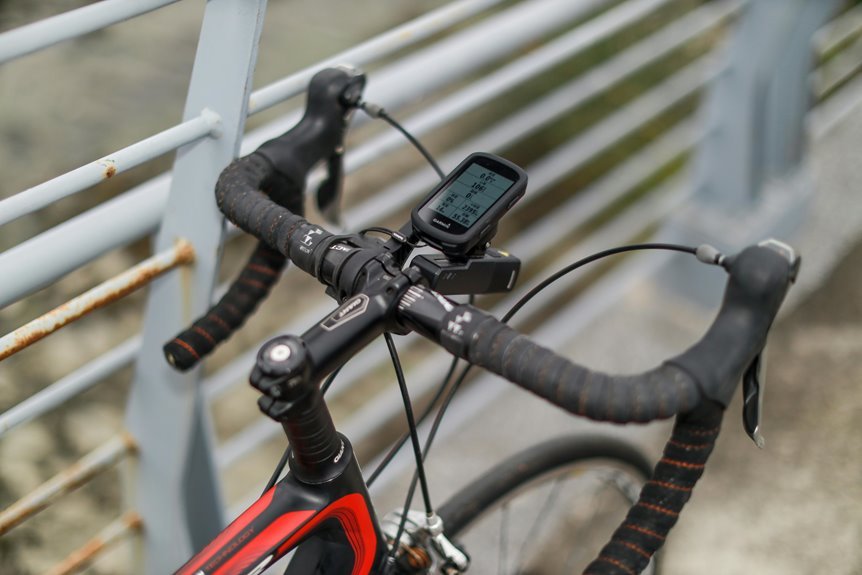
If you want power data you can trust, start with installing the meter correctly and pairing it with the devices you use most. Tighten it to spec, then do a zero-offset calibration before every ride. Next, complete your device pairing setup through ANT+ or Bluetooth so your bike computer, phone, or trainer all speak the same language. Then refine your data display configuration to show watts, cadence, ride time, and power zones clearly.
| Step | Why it matters |
|---|---|
| Install carefully | You feel confident from the first pedal stroke. |
| Calibrate before riding | You know your numbers belong to your effort. |
| Pair every device | Your whole setup works together like a team. |
| Configure screens well | You stay calm, focused, and connected on every ride. |
How to Review Power Data After a Ride
After your ride, you should check your power zones initially so you can see where you worked hard and where you held back.
Next, compare key ride segments like climbs, flats, and intervals to spot pacing mistakes or strong efforts.
As you review more rides over time, you’ll track performance trends that show your fitness is growing and your training is paying off.
Analyze Power Zones
Usually, the best way to review a ride is to start with your power zones, because they show where your effort really went. Check how long you stayed in each zone, then match that time to your goal for the day. If your easy ride drifted into higher zones, your recovery mightn’t have been as easy as you thought.
Next, look at power zone progression across the whole session. You want to see whether your effort stayed steady, built with control, or faded late. Then study zone shift timing. Quick jumps can reveal surges, poor pacing, or terrain changes, while smooth shifts often show better control. As you learn these patterns, your data starts to feel less cold and more like a trusted teammate helping you ride stronger and smarter together.
Compare Ride Segments
Because one ride can hold several different stories, you should split it into key segments and compare them side by side. Start with climbs, flats, descents, and intervals. Then look at average power, cadence, and ride time for each part. This segment by segment comparison shows where you stayed smooth and where your effort faded.
Next, use split efforts analysis to match similar sections, such as two climbs of equal length or repeated interval blocks. You’ll see whether you pushed too hard at the outset, paced well, or lost focus once fatigue hit. That kind of review helps you feel more connected to your training, because the numbers reflect your real choices.
Keep your files labeled clearly, and compare terrain, conditions, and pacing so each segment teaches you something useful for the next ride.
Track Performance Trends
Often, the real value of your power meter shows up as you review the ride and look for patterns that repeat over days and weeks. After each session, open your data and compare average power, normalized power, cadence, and time in zones. You start to see where you’re steady, where you fade, and where you’re growing stronger.
From there, connect single rides to bigger progress. Use seasonal trend analysis to spot fitness changes across training blocks, race prep, and recovery weeks. Then check efficiency factor, TSS, CTL, and FTP against similar rides for long term performance benchmarking. This helps you trust the process, not just one great day or one rough one. As you track the same routes and efforts, you’ll feel more connected to your goals and to the riders chasing progress right beside you too.
How to Use Power Data in Training
When you train with power, you stop guessing and start riding with a clear target you can trust. You also join a smarter, more confident group of riders who train with purpose. Use your FTP to set zones, then let watts guide each ride so easy days stay easy and hard days count.
- Build intervals around power zones to improve strength, speed, and steady endurance.
- Use live watts for race pacing strategies, so you don’t burn out early.
- Practice hill attack tactics by holding strong, repeatable efforts on climbs.
- Review average power, normalized power, and time in zone after each session.
That rhythm helps you connect effort to results. Over time, you’ll spot progress faster, recover better, and show up feeling prepared, not uncertain, for every ride ahead.
How to Avoid Power Meter Tracking Mistakes
To avoid bad data, you should calibrate your power meter before every ride so your numbers start clean and reliable.
Then check your data for consistency during and after the ride, because odd spikes or dropouts can quietly throw off your training.
Should you catch those mistakes at an early stage, you’ll trust your power numbers more and make better decisions on the bike.
Calibrate Before Every Ride
Before every ride, make zero-offset calibration your initial step, because even a highly accurate power meter can drift whenever temperature changes or the bike has been moved. That quick habit keeps your numbers trustworthy, so you can train with the same confidence as the riders around you. Build a simple zero offset routine:
- Wake the meter and your head unit first.
- Keep the bike still and unload the pedals or crank.
- Run calibration and wait for confirmation.
- After ten minutes, do a warmup calibration check whenever conditions changed.
This small ritual helps your data reflect your real effort, not setup noise. It also keeps indoor and outdoor rides speaking the same language.
Whenever you calibrate every time, you give yourself a fair shot to compare workouts, celebrate progress, and feel fully part of the power-based training community.
Check Data Consistency
Although a power meter gives you objective data, you still need to check that the numbers stay consistent from ride to ride, or small errors can quietly mislead your training.
After calibration, compare similar efforts on familiar routes. Whenever your power suddenly jumps or drops without a clear reason, pause and investigate.
Start with data validation checks. Look at cadence, average power, and left-right balance whenever you use dual-sided pedals.
Then confirm equipment pairing consistency between your meter, head unit, phone, and trainer. Mixed connections can create strange files and leave you second-guessing your work.
You also want the same bike setup, battery health, and firmware status each week. That way, your data stays trustworthy, your progress feels real, and you stay connected to the shared standards serious cyclists rely on every day.
How to Set Better Goals With Power Data
Since power data shows exactly what you can do on the bike, it helps you set goals that are clear, honest, and much easier to reach. You stop guessing and start building trust in your training, which helps you feel part of a smart, steady cycling community.
- Use goal setting models to match goals to your current FTP, not wishful believing.
- Create milestone based targets, like holding sweet spot power longer or raising average power on a favorite climb.
- Track weekly progress with zones, TSS, and efficiency factor, so each ride feels connected to something bigger.
- Adjust goals after tests and races, because your numbers tell the truth, even during your ego wants a heroic story.
That way, you chase progress you can actually own, celebrate, and share with your riding group proudly.
Frequently Asked Questions
How Long Do Bike Power Meter Batteries Typically Last?
Most bike power meter batteries last about 100 to 300 riding hours. The exact lifespan depends on the meter model, battery type, temperature, and how often you ride. Check your battery status regularly and plan on replacing it every few months if you ride often.
Can Power Meters Be Used for Indoor Cycling Only?
Yes, you can use a power meter only for indoor cycling and still get accurate watt data, cadence tracking, and reliable feedback for structured training. The main limitation is that you will not be able to measure how those indoor improvements translate to outdoor riding conditions or trail performance.
Are Bike Power Meters Waterproof in Heavy Rain?
Most bike power meters handle heavy rain well because they are built with weather sealing and rain resistance. Riding in a downpour is usually fine, but it is smart to check the manufacturer’s IP rating and inspect the seals from time to time.
Do Power Meters Work With Every Bike Computer?
No. A power meter and a bike computer must support the same connection standard, usually ANT+ or Bluetooth, before they can pair correctly. Check both devices first so your setup works reliably on every ride.
Is a Dual-Sided Power Meter Worth the Extra Cost?
Yes, if you want more precise data, better left to right insight, and more informed training, it is worth the extra cost. You get true dual sided measurement, can identify power imbalances, and can refine bike fit, pacing, and technique with greater confidence.