
Bike navigation can feel simple until you miss a turn, lose signal in a dense city, or end up squinting at a tiny screen mid-ride. The right cycling computer keeps directions readable, logs your stats cleanly, and fits the way you actually ride, whether that means weekday commuting, weekend training, or long gravel outings.
This roundup focuses on compact units, map-capable screens, button-first controls, and larger premium displays. You’ll see where each pick fits best, along with the trade-offs that matter once it’s mounted on your bars.
The Shortlist At A Glance

Beeline Velo 2 Bike Computer with Navigation and Smart Routing

Garmin Edge 540 Compact GPS Cycling Computer

Garmin Edge Explore 2 GPS Cycling Navigator

Garmin Edge 1050 Premium Cycling Computer

GEOID CC700 Pro 2.8″ Color Touchscreen GPS Bike Cycling Computer
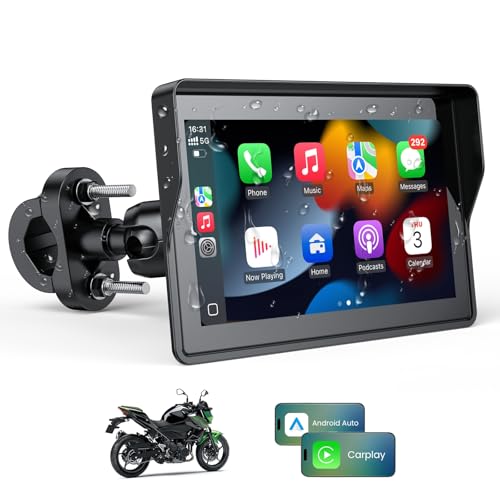
5 Inch Motorcycle Carplay GPS Navigation System

GEOID CC700 2.8″ Color Screen Bike Cycling Computer Wireless

Wireless GPS Bike Computer 2.4″ Screen
More Details On Our Top Picks
The Beeline Velo 2 leans into simplicity, which helps a lot on city rides where you want directions without a crowded screen. Its smart routing and GPX import make it useful for commuters, weekend explorers, and anyone following preplanned routes.
Compared with Garmin-heavy options later in this list, it feels more stripped back and less training-focused. That trade-off is useful for you as soon as your priority is fast glanceability, not a long menu of metrics.
Strong Points
- Smart routing keeps the display focused on the route instead of packing the screen with extras.
- GPX import helps you follow saved rides from mapping tools and club route files.
- The compact shape suits smaller handlebars and keeps the cockpit tidy.
- Water and shock resistance make it a sensible match for mixed-weather commuting.
- An 11-hour battery is a comfortable fit for many day rides and regular urban use.
Things To Consider
- The simpler interface leaves less room for advanced training data than the Edge 540 or Edge 1050.
- Longer all-day adventures may ask more of the battery than short city loops.
- Route followers who like rich maps may prefer a larger display elsewhere in this roundup.
Feature Snapshot
Who It Suits Best
Urban commuters and casual route followers get the most value from this compact setup, especially on bikes where handlebar space is tight.
A Better Fit Elsewhere
Garmin Edge Explore 2 suits riders who want a more familiar full-screen navigator for longer leisure rides and route-rich weekends.
Button controls give the Edge 540 an advantage on wet mornings, gloved hands, and rough surfaces where touchscreens can get fiddly. The adaptive coaching and advanced navigation lean hard toward structured training, so this pick makes sense for riders who care about workout guidance as much as turn-by-turn directions.
Compared with the Beeline Velo 2, this model asks a little more from you but returns more depth in training and route handling. The honest read is that the compact body keeps things practical, while the feature set fits riders who want data without moving up to the bigger 1050.
What We Like
- Physical buttons are easier to manage in bad weather or with full-finger gloves.
- Adaptive coaching supports riders who follow structured sessions and want guidance on the road.
- The compact size sits neatly on the bars without crowding lights or phone mounts.
- Advanced navigation helps you stay on track during long training rides and unfamiliar loops.
Room For Improvement
- Button-first control feels less immediate than a touchscreen for quick map panning.
- The training focus can feel like more system than casual riders actually need.
- Riders who only want simple route prompts may find the learning curve a little steeper.
Core Details
Who Should Grab It
Riders who train regularly, ride in mixed weather, or prefer tactile controls will get the most from this model.
Where A Sibling Pick Shines
Garmin Edge Explore 2 suits relaxed route riders who want Garmin navigation without the stronger training lean of the Edge 540.
The Edge Explore 2 is built around straightforward routing, which makes it appealing for leisure cyclists who want clear guidance without training complexity. It fits a very common real-world pattern, regular weekend rides where you want to follow a mapped course and keep your attention on the road.
Unlike the Edge 540, this one reads as less training-centric and easier to hand off to someone who just wants directions that make sense. You may find that balance especially useful on family rides or touring days where simplicity matters more than workout coaching.
Bright Spots
- The navigator-style layout keeps route following approachable for casual use.
- It works well for riders who want less menu diving and more riding.
- The larger Garmin ecosystem makes route planning feel familiar for many cyclists.
- Its focus on navigation suits touring, sightseeing, and steady weekend mileage.
Softer Spots
- It gives up some of the training depth found on the Edge 540 and Edge 1050.
- Riders chasing richer performance metrics may want more detail than this class offers.
- Simple controls are helpful, but power users may outgrow the lighter feature set.
Details At A Glance
The Right Fit
Recreational cyclists, touring riders, and anyone who wants simple route guidance will feel at home here.
Another Choice May Suit
Beeline Velo 2 is a better fit for commuters who want a smaller, more minimalist setup with a cleaner cockpit.
The Edge 1050 is the most display-forward pick in this group, and that matters more than it sounds like on fast road rides or long days in the saddle. A large vivid touchscreen, built-in speaker, Garmin Coach support, group ride tools, and road hazard alerts point toward riders who want the cockpit to do a lot.
Compared with the Edge 540, this model feels more expansive and easier to read at a glance, though that extra polish will only matter to you if you actually use the richer features. The trade-off is plain: more capability usually means a busier experience and a higher place in the lineup.
Highlights
- The large touchscreen makes maps, metrics, and prompts easier to scan quickly.
- The built-in speaker adds another way to catch alerts without staring at the display.
- Garmin Coach fits riders who want structured guidance instead of loose route notes.
- Group ride and hazard features suit longer road sessions with more moving parts.
Areas To Watch
- The feature depth can feel excessive for simple commute or coffee-shop rides.
- A larger screen often means more attention on setup and preference tuning.
- Casual riders may not use enough of the advanced tools to justify the jump from the Edge 540.
Technical Sheet
Built With In Mind
Road cyclists, structured trainers, and riders who want a larger visual interface will get the most from this unit.
Swap It Out When
Garmin Edge 540 makes more sense for riders who want a compact body and button controls instead of a large touchscreen.
The CC700 Pro packs a lot into a 2.8-inch color touchscreen, which makes it attractive for riders who want map navigation without moving into the most expensive tier. WiFi auto-sync, ANT+ and Bluetooth support, message notifications, IPX7 water resistance, and indoor training support give it a broad feature list for mixed-use riders.
Compared with the Garmin picks, this one feels more value-driven and less polished around ecosystem depth. That is not a flaw by itself, but it does mean you should care more about the feature mix than the brand ecosystem.
Upsides
- The 2.8-inch touchscreen keeps route information easy to see in a compact footprint.
- Re-route planning helps you recover more gracefully after a missed turn.
- WiFi auto-sync reduces the fuss of updating rides and settings.
- ANT+ and Bluetooth support broaden compatibility with common bike sensors and accessories.
- IPX7 water resistance makes it a sensible companion for wet commutes and changeable weather.
- Indoor training support adds usefulness beyond outdoor navigation.
Small Caveats
- Touchscreen control can be less friendly in persistent rain or with heavy gloves.
- The long feature list may take a little setup time before it feels natural.
- Riders who want a simpler experience may not need the notifications or sync tools.
Quick Facts
Whose Shelf It Belongs On
Feature-minded cyclists who want maps, sensor pairing, and indoor use from one unit should take a close look here.
Reach For A Different Pick When
Garmin Edge 1050 suits riders who want a larger display and a more premium interface for demanding road use.
This one sits a little outside the pure cycling lane, because it brings a 5-inch portable screen, CarPlay, Android Auto, Siri, Google Assistant, and dual Bluetooth into a motorcycle setup. For riders who split time between bikes and other road-going machines, that crossover convenience can feel very natural.
Compared with the smaller bike computers above, it is built more like a display hub than a compact bar-mounted cycling unit. The catch is that you are buying for a broader powersports use case, not for the leanest possible bike-only cockpit.
Reasons To Buy
- The 5-inch screen offers a much larger visual target than standard cycling computers.
- CarPlay and Android Auto bring familiar phone-linked navigation into the ride.
- Voice assistant support makes hands-on interaction less central once you’re moving.
- Dual Bluetooth broadens connection options for paired devices.
Worth Noting
- It is a different category fit than the dedicated bike computers in this roundup.
- Riders who want a tiny cockpit footprint will find the screen size more assertive.
- The product listing also notes that TPMS is not included, so tire monitoring needs separate gear.
Feature Card
Best Suited To
Powersports riders who want a larger display and smartphone-style interface will see the strongest fit here.
Look Elsewhere When
Beeline Velo 2 makes more sense for riders who want a much smaller bike-first computer with a cleaner bar setup.
The wireless CC700 keeps the formula straightforward, which suits riders who want map navigation and sensor support without a bulky setup. Fast 5-second GPS positioning stands out on paper because it helps shorten the wait between powering up and rolling out, especially on short commutes or repeat training loops.
Compared with the CC700 Pro, this version trims some extras and aims for a cleaner, simpler routine. That makes it a nice middle ground for riders who want useful navigation without stepping into a longer feature list than they plan to use.
Best Bits
- Wireless design keeps the setup tidier on the handlebar area.
- Route navigation with re-route planning helps recover from missed turns.
- WiFi auto-sync reduces repetitive manual updates.
- ANT+ and Bluetooth support help it fit into common sensor setups.
- Fast GPS positioning is handy when you want to start riding quickly.
- Indoor training support adds off-bike usefulness.
Minor Gripes
- The 2.8-inch screen is useful, but riders wanting a larger map view may want more space.
- Wireless convenience can still come with a little setup work at first.
- People who depend on very detailed training analysis may want a higher-tier model.
Core Details
Made For
Everyday cyclists who want a compact, wireless cycling computer with quick startup behavior will feel right at home.
Where Shoppers Go Wrong
Garmin Edge Explore 2 suits riders who want a more polished navigation experience and are willing to pay for that extra refinement.
This Bikevee unit is built around the basics, with a 2.4-inch screen, 650mAh battery, IPX7 water resistance, and ride data such as speed, odometer, altitude, gradient, and ascent. That makes it a good fit for cyclists who want core numbers without moving into map-heavy navigation or training complexity.
Compared with the GEOID models, it is more direct and less feature dense, which can be a relief for riders who just want the essentials. You may find the 28-hour runtime especially useful on long weekend rides or when you forget to charge as often as you should.
Positives
- The data set covers the basics you actually check during regular rides.
- 28-hour runtime supports longer gaps between charging sessions.
- Auto backlight helps the display stay readable as light changes through the day.
- IPX7 water resistance makes it a practical choice for damp routes and messy weather.
- The compact 2.4-inch screen keeps the cockpit uncluttered.
Points To Note
- The smaller display leaves less room for rich navigation graphics.
- Riders who want route guidance and rerouting tools will need a different kind of unit.
- The simpler feature set is useful, but it may feel plain for data-heavy cyclists.
At A Glance
Who Will Love This
Riders who want simple ride tracking, long runtime, and a compact screen should feel comfortable with this choice.
Not Your Match When
GEOID CC700 Pro is the stronger fit for cyclists who want touch navigation, sync features, and a more connected setup.
How To Choose The Right Bike Navigation Gps
Match The Screen To Your Ride Style
Screen size shapes the whole experience. A 2.4-inch or 2.8-inch display works well for commuters and riders who mainly want quick prompts, while the larger 5-inch motorcycle-style unit suits a different cockpit entirely.
Touchscreens feel easy on dry days, but button control stays dependable with gloves, rain, or bumpy pavement. That’s why the Edge 540 makes sense for training-heavy riding, while the Beeline Velo 2 suits people who want a lighter visual load.
Decide How Much Navigation Depth You Need
Some units lean toward turn-by-turn route following, while others add reroute planning, GPX import, and larger map tools. Route depth matters most on unfamiliar roads, touring weekends, and club rides where missing a turn can throw off the whole day.
For simple city loops, a cleaner navigator can be enough. For long rides far from home, the stronger map and reroute features on the Garmin and GEOID options make more sense.
Look At Battery Life And Charging Rhythm
Battery numbers matter less as abstract figures and more as habits. An 11-hour unit fits many daily rides, 26 hours supports longer training days, and 28 hours helps when your rides stretch over a weekend.
The right choice depends on how often you actually charge gear. Riders who leave home early and return late usually benefit from a larger reserve, while short-commute cyclists can keep things simpler.
Check Compatibility Before You Mount It
Sensor support, wireless standards, and route file handling shape how useful a bike computer feels after the first week. ANT+ and Bluetooth support matter for riders who pair heart rate, cadence, or speed sensors, while GPX import matters for planned routes.
Think about your current setup, not just the feature list. The GEOID models and Garmin units fit more connected riding habits, while the Bikevee pick stays focused on core ride data.
Things Worth Knowing First
Hidden Buying Traps
Plenty of shoppers fixate on screen size and forget controls, mounting style, or route import. A bright display helps only after the unit is easy to use on the move.
Another common miss is buying a feature-heavy model for casual loops, then never touching half the menu. Keep your focus on the rides you actually do.
The Upgrade Payoff
Higher-tier units usually cost more because they bring larger displays, richer navigation, coaching tools, and broader ecosystem support. That extra money also goes toward better visibility in motion and more refined interaction.
For training riders and long-distance road cyclists, the upgrade can feel practical rather than indulgent. For short commutes and relaxed weekend spins, a simpler unit often leaves you happier.
Frequently Asked Questions
Do you need a map display for everyday commuting?
No, many commuters only need clear turn prompts and a screen that’s easy to read quickly. A smaller unit like the Beeline Velo 2 can fit that routine very well.
Are button controls better than touch controls?
Button controls are often easier in rain, cold, or with gloves on. Touchscreens feel faster for map work and menu browsing on dry rides.
What does ANT+ support matter for?
ANT+ helps bike computers talk to many common sensors and accessories. It matters most for riders who track cadence, heart rate, or speed with separate gear.
Is a larger screen always better?
Not always, because a larger display can add clutter to the handlebar area and invite more menu browsing. It pays off most on long road rides, touring, and detailed navigation.
Which pick works best for simple ride data?
The Bikevee wireless bike computer suits that use case well with its speed, odometer, altitude, gradient, and ascent readouts. It keeps the focus on the basics without asking you to manage a heavier feature set.
Closing Thoughts
The right Bike Navigation Gps depends less on brand names and more on how you ride. For quick commutes, the Beeline Velo 2 keeps things clean and simple. For training, the Edge 540 and Edge 1050 bring more depth, while the GEOID and Bikevee picks cover useful middle-ground and entry-level needs. Pick the one that matches your routes, your cockpit space, and how much information you actually want at a glance.