
Riding with a phone in your pocket works fine until glare, battery drain, or a missed turn slows you down. A dedicated cycling navigator keeps route cues, speed data, and ride planning in one place, which matters on daily commutes, long weekend loops, and unfamiliar roads. The right pick depends on how much screen space, routing help, and battery endurance you want. Some of these models keep things simple, while others lean toward training tools or more advanced navigation.
Quick Look At The Shortlist
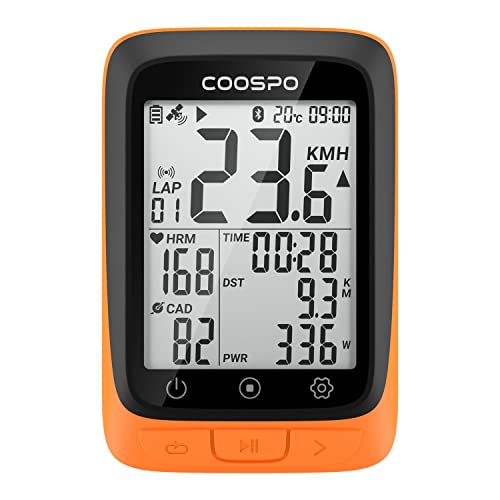
CooSpo Bike Computer Wireless GPS

iGPSPORT BSC100S GPS Bike Computer Wireless

CYCPLUS GPS Wireless Bike Computer M1
Beeline Velo 2 Bike Computer with Navigation

Garmin Edge 540 Compact GPS Cycling Computer

Garmin Edge Explore 2 GPS Cycling Navigator

CooSpo Bike Computer Wireless GPS BC200
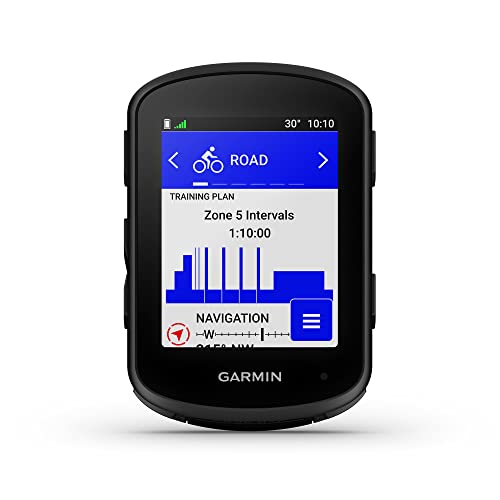
Garmin Edge 840 Compact GPS Cycling Computer
More Details On Our Top Picks
This CooSpo unit suits riders who want GPS basics without a bulky setup. The 2.4-inch LCD gives you a compact screen, while Bluetooth and ANT+ support help it pair with common sensors and accessories. Auto backlight is useful during early starts or late returns, though the smaller display will feel tighter than the bigger screens on the iGPSPORT BSC100S and CYCPLUS M1.
The honest read is that this fits commuting, fitness loops, and casual route following better than deep training work. The waterproof build and wireless layout keep the bars cleaner, and the simple shape is easy to live with on a road bike or hybrid. You may find it a bit modest for riders who want detailed map visuals, but that restraint also keeps it approachable.
What We Like
- 2.4-inch LCD stays compact on crowded handlebars
- Bluetooth and ANT+ broaden sensor pairing options
- Auto backlight helps in low light
- Wireless setup keeps the cockpit tidier
Room For Improvement
- Smaller screen gives you less room for route detail
- Simple layout suits basics more than deep analysis
Feature Rundown
Who It Suits Best
Riders who want a straightforward GPS computer for commuting, errands, and regular fitness rides will get the most from it.
A Better Fit Elsewhere
Garmin Edge 540 suits you better for harder training sessions and richer navigation cues.
Compared with the CooSpo pick, this iGPSPORT gives you a slightly larger 2.6-inch LCD and a very practical 40-hour recharge cycle. That combination makes sense for weekend riders, bike commuters, and anyone who dislikes charging gadgets every other day. Bluetooth and ANT+ support keep it flexible, and the screen size is still small enough to stay unobtrusive.
For longer rides, the battery figure matters more than flashy extras. You may find the interface more utilitarian than elegant, yet that plain approach is part of the appeal for steady use. It feels like the kind of navigator that stays in the background until you need it, which is usually the best thing a simple cycling computer can do.
Bright Spots
- 40-hour recharge range helps stretch between plug-ins
- 2.6-inch display leaves a little more room than compact rivals
- Bluetooth and ANT+ support widen setup choices
- Good fit for steady, repeat use
Points To Note
- Plain presentation may feel basic beside premium units
- Screen size still favors data over rich maps
Core Details
Made For
You benefit most here when your rides are regular, your route needs are simple, and battery endurance matters more than bells and whistles.
Skip It When
CYCPLUS GPS Wireless Bike Computer M1 suits you better when you want longer run time and broader training sync options.
The M1 stands out by pairing a 2.9-inch LCD with 4-satellite positioning and a 1200mAh battery, so it leans more toward long days in the saddle than brief hops around town. That four-satellite setup, which means it can draw position data from multiple global navigation systems, can help the unit stay more consistent in mixed riding environments. For riders who follow routes, log sessions, and appreciate a larger view, that balance is appealing.
Compared with the iGPSPORT BSC100S, you get a larger screen and stronger integration with CYCPLUS FIT and Strava. The trade-off is that this is still a data-first computer, so you should expect clean ride metrics more than deep mapping visuals. It suits training-minded cyclists who want something straightforward, durable, and easy to sync after the ride.
Upsides
- 2.9-inch screen gives more breathing room for ride data
- 1200mAh battery supports long riding days
- IPX6 rating helps in wet weather conditions
- Sync support with CYCPLUS FIT and Strava helps post-ride tracking
- Bluetooth and ANT+ add accessory flexibility
Softer Spots
- Navigation visuals still lean simpler than map-heavy units
- Larger feature set can feel more than casual riders need
Feature Snapshot
Right Fit For
Training riders and long-distance weekend cyclists will get the most from this model’s battery and syncing mix.
Where A Sibling Pick Shines
Beeline Velo 2 suits you better when your priority is glanceable navigation for city streets rather than training-style data depth.
Beeline takes a different path from the screen-first models above, and that matters in busy streets. Its smart routing and GPX import lean into navigation guidance instead of loading you up with extra data panes, so the result feels lighter and more focused. For urban commuting, that stripped-back approach can be easier to trust than a cluttered dashboard.
The 11-hour battery is decent for shorter rides and day trips, and the water- and shock-proof build suits rougher handling. You may find the interface especially friendly on mixed-route days, though riders chasing long training blocks may want a unit with more endurance. It feels like a small compass rather than a control center, and that’s the point.
Reasons To Buy
- Smart routing keeps navigation front and center
- GPX import helps with planned routes
- Water- and shock-proof build suits daily carry
- Simple approach works well in city traffic
Areas To Watch
- 11-hour battery is modest beside endurance-focused units
- Less suited to riders who want deep data screens
Details At A Glance
Whose Shelf It Belongs On
City riders and commuters who value clear guidance over dense ride metrics will feel at home with it.
Another Choice May Suit
Garmin Edge Explore 2 is the better match for touring riders who want a more traditional navigator feel and broader route support.
The Edge 540 shifts from simple navigation into a more serious riding tool. Button controls help in wet weather and with gloved hands, which is handy on long road rides or variable conditions where touch input can feel fussy. Advanced navigation and targeted adaptive coaching make it more appealing for cyclists who train with purpose, not just commute.
Against the simpler CooSpo and CYCPLUS units, this Garmin is the step up that matters most for structured riding. The compact body keeps it manageable on the bars, and the up to 26-hour run time is useful for full-day efforts. The catch is that you pay for that depth with more complexity, so casual riders may not use everything it offers.
Strong Points
- Button controls work well in rain and gloves
- Advanced navigation helps on unfamiliar roads
- Targeted adaptive coaching suits training plans
- Up to 26 hours supports long outings
- Compact body avoids a bulky cockpit
Honest Caveats
- Feature depth can outgrow casual riding needs
- Setup takes more attention than simpler units
Spec Overview
Built With In Mind
Dedicated cyclists, event riders, and anyone following training plans will get the most from this computer.
Look Elsewhere When
iGPSPORT BSC100S suits you better for a simpler, longer-charge everyday setup without as much training depth.
Where the Edge 540 leans into training, the Explore 2 keeps its focus on getting you where you meant to go. That makes sense for touring, leisure rides, and unfamiliar neighborhoods where easy direction matters more than performance layering. The setup feels friendlier for riders who want a GPS cycling navigator without a steep learning curve.
The trade-off is straightforward: you choose simplicity over advanced training features. For most weekend riders, that is a good exchange, especially since the category is already crowded with devices that ask for more attention than they give back. It fits best on bikes that see mapped routes, not structured workouts.
Best Bits
- Navigation-first design keeps route guidance easy to follow
- Friendly interface lowers the learning curve
- Strong fit for touring and leisure riding
- Less distracting than training-heavy computers
Small Caveats
- Not aimed at riders who want coaching tools
- Touring focus means less appeal for data-heavy training
Feature Card
Who Should Grab It
You benefit most here when your rides revolve around navigation and comfortable route following rather than workout metrics.
Reach For A Different Pick When
Garmin Edge 840 suits you better if you want a more advanced compact computer with extra versatility.
The BC200 keeps things plain in a way that many commuters will appreciate. Auto backlight improves screen visibility in darker conditions, while Bluetooth and ANT support make it easier to pair with common riding accessories. Because it works with the CooSporide app, the unit also has a simple path for riders who like basic ride tracking without building out a complicated setup.
Compared with the newer CooSpo GPS model above, this one reads as a simpler, app-friendly option rather than a screen-first navigation device. That smaller ambition is useful for riders who want dependable ride data and easy pairing more than route-heavy features. The honest caveat is that your use case needs to be straightforward for this to feel like the right fit.
Highlights
- Auto backlight helps with early or late rides
- Bluetooth and ANT support keep it flexible
- CooSporide app compatibility adds basic tracking convenience
- Wireless layout keeps the bars uncluttered
Worth Noting
- App-centered use may be enough for basics, not more
- Navigation depth is lighter than premium route-focused models
Core Details
The Right Fit
Casual cyclists and commuters who want a tidy, low-fuss computer will get the most from it.
Where Shoppers Go Wrong
Garmin Edge 540 is the better choice for riders who expect deeper navigation and stronger workout tools.
The Edge 840 sits in the middle of the lineup with a compact body and a broader feature set than the simpler computers here. That makes it a strong match for riders who want room to grow into more advanced navigation without jumping to a larger training-first unit. It feels polished without being oversized, which matters on bikes where handlebar space is already crowded.
Compared with the Edge Explore 2, this model suits riders who want more depth in a smaller package. The trade-off is that its extra capability makes the learning curve a bit steeper than a basic navigator, yet many regular cyclists will see that as a fair exchange. It is the sort of pick that can stay useful as your riding habits become more serious.
Standout Traits
- Compact body keeps the cockpit tidy
- Broader feature set supports more demanding ride plans
- Good step-up choice for riders adding complexity over time
- Balances navigation depth with manageable size
Minor Gripes
- More features can mean a longer learning curve
- Not as immediately simple as entry-level navigators
Quick Facts
Perfect Match For
You get the most from it when you want a compact navigator that can keep pace with more ambitious riding.
Swap It Out When
Beeline Velo 2 suits you better for a cleaner, route-only approach in the city.
How To Choose The Right Bike Computers For Navigation
Screen Size, Controls, And Glanceability
Start with the way you actually ride. A 2.4 to 2.9-inch LCD works well for basic metrics and route prompts, while a more navigation-heavy setup can feel easier to read on longer rides, especially when you want to glance down for a second and move on.
Controls matter just as much as screen size. Button-driven units, such as the Garmin Edge 540, are easier to manage in rain or with gloves, while simpler layouts suit commuters who want less fuss. Touch-friendly simplicity can be pleasant, but only when the display and route layout stay uncluttered.
Battery Endurance And Charging Rhythm
Battery life changes how often the computer becomes part of your routine. A 40-hour figure, like the iGPSPORT BSC100S, fits riders who log frequent short trips and do not want to charge every few rides, while 11-hour options fit day rides and city use better than full touring.
The trade-off is usually size, features, or both. Bigger navigation tools and richer routing often draw more power, so long-distance cyclists should weigh endurance against map detail and training depth. For most casual use, a moderate battery can still be enough, provided the device matches the length of your normal week.
Routing Style Versus Training Depth
Not every cycling computer is trying to do the same job. Beeline Velo 2 focuses on smart routing and GPX import, which is a good fit for route-led riding, while Garmin Edge 540 and Edge 840 lean harder into training support and advanced navigation.
That split matters more than brand names. Riders who follow planned paths through towns or on trips usually want guidance that stays simple, while performance-minded cyclists often need coaching cues, more data layers, and a computer that grows with a structured plan. Choose the device that matches the kind of ride you do most often, not the one with the longest feature list.
Sensor Support, Apps, And Setup Convenience
Bluetooth and ANT+ support are worth close attention because they shape the rest of the setup. These wireless links let the computer work with common sensors and accessories, so you can keep speed, cadence, and related ride data in one place without cluttering the cockpit.
App support also changes the day-to-day experience. CYCPLUS FIT and Strava syncing make post-ride logging easier, while app-based systems such as CooSporide can feel friendlier for riders who just want a simple connection path. The practical question is whether you want fast setup and lightweight tracking, or a more layered system that asks for a little more attention.
What To Weigh Before You Click Through
Common Shopping Slip Ups
Plenty of cyclists focus only on battery life and forget the screen size, which is a mistake on compact handlebars. A small LCD can be fine for speed and timer data, but route detail gets cramped fast.
Another common miss is buying a computer with more coaching than you’ll ever use. For commuting and casual riding, navigation clarity and easy pairing usually matter more than training analytics.
Where The Extra Money Goes
Higher-tier models usually spend that extra cost on richer navigation, more polished controls, and broader training tools. The Garmin Edge 540 and 840 also give you a more flexible path as your rides get longer or more structured.
That upgrade can be worth it for riders who cover unfamiliar roads often or follow training plans. For short city loops, a simpler device may be the smarter use of your budget because it keeps the dashboard clear and the learning curve mild.
Frequently Asked Questions
Do Bike Computers For Navigation Need Phone Service?
Many units can guide you without an active phone connection once the route is loaded. Bluetooth and app syncing still help with setup, uploads, and accessory pairing.
Is ANT+ Better Than Bluetooth For Cycling Sensors?
Neither one is universally better, because both have common uses in cycling gear. ANT+ often appears in bike accessories, while Bluetooth is handy for broad device compatibility.
How Much Screen Size Is Comfortable For Navigation?
Smaller displays work well for speed, cadence, and short prompts. A larger screen makes route cues easier to read on longer rides or unfamiliar roads.
Are Button Controls Better Than Touch Controls?
Button controls are easier to trust in rain, gloves, or rough conditions. Touch controls can feel more fluid, but they depend more on screen responsiveness and weather.
Which Model Fits Casual Weekend Riding Best?
The Garmin Edge Explore 2 and Beeline Velo 2 both make sense for route-led riding. The better choice depends on whether you want a traditional navigator or a smaller, simpler guide.
Closing Thoughts
You have a wide spread here, from compact daily trackers to more advanced cycling navigators that can grow with your riding. For straightforward commutes, the simpler CooSpo and iGPSPORT picks keep things easy. For longer routes, training structure, or more confident navigation, the Garmin Edge 540 and Edge 840 earn their place. Match the computer to your usual roads, not the most crowded spec sheet, and you’ll end up with something you actually enjoy using.