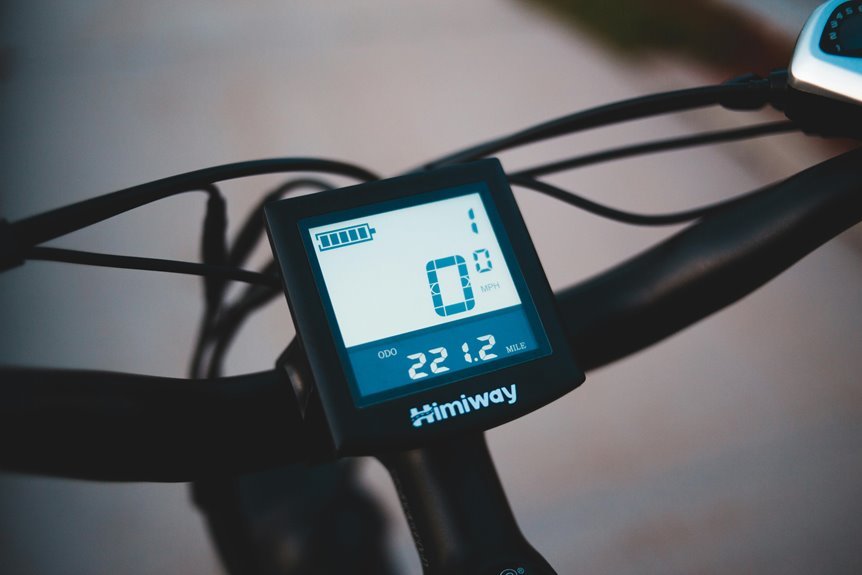

A smart e-bike display shows live speed, battery level, trip distance, and other ride stats. It helps you make quick choices without guessing. That can help you save battery and keep a steady pace. Some displays feel like a helpful ride buddy, while others just look cool.
What a Smart E-Bike Display Shows
What does a smart e-bike display actually show? It puts the ride info you care about right in front of you, so you don’t feel lost on the road.
You can see your current speed, battery percentage, distance, and total or trip mileage at a glance. That helps you stay in control and plan your next stop with confidence.
Many screens also show time, temperature, and gear status, which keeps things simple whenever you’re riding with others or exploring new paths.
With display customization, you can choose what stays visible initially. And with sensor diagnostics, you can check that your bike’s key systems are working well.
In short, the display helps you ride informed, calm, and ready for what comes next.
Why Live Ride Data Matters
As you can see live ride data as you move, every mile feels easier to manage and a lot less stressful. You don’t have to guess what’s happening, and that helps you stay calm with your group. Real time awareness gives you the small signals that keep the ride smooth and connected.
- You adjust quickly when speed changes.
- You notice battery use before it surprises you.
- You keep ride safety steady on busy streets.
- You plan your next move with confidence.
Because the display updates right away, you can ride smarter without losing focus. That instant feedback helps you feel included in the flow of the road, not left behind by it.
Whenever your bike speaks clearly, you respond faster, and the whole ride feels more natural.
Smart Display Metrics That Matter Most
You’ll get the clearest ride perspective whenever your display keeps speed and distance front and center, because those numbers help you stay in control and plan your trip with less stress.
Then battery and range data step in, so you know how far you can go before you need to recharge.
Together, they turn your screen into a calm, useful guide instead of a confusing set of numbers.
Speed And Distance
- Watch current speed to ride smoothly.
- Compare trip distance with your goal.
- Notice changes as the route gets tough.
- Celebrate each mile, even the short ones.
Together, these numbers keep you informed without crowding your screen.
You don’t need to guess.
You get simple proof that you’re moving, improving, and part of a steady riding routine.
Battery And Range
Once you know how fast and how far you’ve gone, the next thing your eyes usually seek is the battery, because that little bar can change how you ride in a real, personal way. You don’t just see a percentage; you get charge estimation that tells you whether today’s route feels easy or risky. That calm matters during you’re riding with friends and want to keep pace without guesswork.
| Display cue | What it means |
|---|---|
| SoC bar | Your usable power now |
| Range estimate | Miles left on this ride |
Smart battery diagnostics also help you spot heat, weak cells, or odd voltage before they spoil the fun. Then you can plan smarter, ride longer, and stay in the loop with your crew.
How Smart Displays Improve Daily Rides
Whenever your daily ride feels smoother, safer, and less stressful, a smart display is doing a lot of quiet work for you. It gives you daily convenience through putting speed, distance, and battery info right where you can see it, so you stay focused and calm. That clear view builds ride confidence, especially as traffic gets busy or your route changes.
You also feel more connected to your bike and your crew of riders as the screen keeps things simple:
- Real-time speed for steady control
- Battery percentage to cut worry
- Trip distance for easy planning
- Extra details like time, temperature, and gear status
With smart display data, you ride with less guesswork and more ease. That kind of support makes every commute feel a little more like your own lane.
How to Choose the Right Smart Display
When you choose a smart display, start with screen size and visibility, because you need to read speed, battery level, and directions at a glance.
Then check connectivity and compatibility, so the display can pair smoothly with your apps, phone, or bike system.
A good match feels easy on your eyes and simple to use, even on a bumpy ride.
Screen Size And Visibility
A smart display only helps when you can read it fast, without squinting or guessing. You want a screen that fits your handlebars and your eyes, so the ride feels smooth and calm. Good sunlight readability keeps the numbers clear when glare hits, and smart display mounting helps you angle the screen where you look naturally. Pick a size that lets you catch speed, battery, and distance at a glance. For a better fit, check:
- A larger screen for quick reading
- Bold text that stays clear in bright light
- A mount that keeps the display steady
- A layout that matches your riding style
When you feel included by your gear, every ride starts to feel like your ride.
Connectivity And Compatibility
Because your smart display works like a ride partner, it should connect with the gear and apps you already trust, not fight them.
Check app compatibility first, so your rides can sync with Apple Health, Google Maps, or STRAVA without extra hassle.
Then look for wireless pairing that uses Bluetooth or ANT+ and stays steady when you bounce over rough pavement.
If you want deeper control, pick a display that can talk to your bike’s battery and motor system, too.
That link helps you see range, time, and ride data in one place.
Also, choose one that supports updates through your phone.
When your devices speak the same language, you feel right at home on every ride, and that small win matters.
How Navigation and App Features Work Together
Your smart electric bike works best whenever guidance and app features talk to each other in real time, since that teamwork turns your ride into a smoother, safer experience. Whenever you open your map app, it can send turn-by-turn directions to the display, while your speed, battery, and distance stay visible at a glance. That means you stay in the moment and still feel connected to your crew.
- Start the route sharing workflow before you roll.
- Let the app sync live traffic and weather.
- Follow voice guided detours whenever roads change.
- Save the trip so your group can compare routes later.
Because everything updates together, you spend less time guessing and more time riding with confidence.
Common Smart Display Problems and Fixes
Even the smartest bike display can act up now and then, but most issues are simple to spot and fix before they ruin your ride. If your screen looks crooked or shows odd numbers, start with screen calibration issues. Clean the display, restart the bike, and check the settings first. When the screen fades, flickers, or won’t wake up, inspect the battery connection and cable ends for looseness.
Next, if buttons feel stuck or the touch response lags, dry the unit fully and remove dirt from the edges. You also want to watch for damage from rain and rough roads. Strong waterproofing and durability matter, but seals can still wear out.
How to Get More From Your Smart Display
- Put current speed front and center.
- Track battery percent and range before hills.
- Add routing, time, or temperature for easy glance checks.
- Save ride stats to compare trips and improve your pace.
When your screen fits your needs, you ride with more confidence and less guesswork.
Frequently Asked Questions
How Accurate Is the Displayed Battery Percentage During Cold Weather?
Cold weather can make the battery percentage less exact as performance drops, but you still get a useful estimate. That helps you plan rides, keep control, and reduce the chance of unexpected shutdowns.
Can the Display Work Without a Smartphone Connected?
Yes, you can use the display without your phone. It still provides key ride data, standalone navigation, and offline use. You can stay informed and keep riding with confidence even when your smartphone is not nearby.
Does Route Tracking Store Rides When the Display Is Offline?
Yes, you can usually save ride logs while the display is disconnected, then sync your route history later. Your rides stay together, so you can keep track of your cycling record even when the display is offline.
How Often Does the Display Update Speed and Distance Readings?
Speed and distance usually refresh every second or faster, depending on the display’s update rate and sensor response. That gives you timely feedback while you ride.
Can Anti-Theft Alerts Trigger if the Bike Is Powered Off?
Yes, you can still receive power loss alerts, and the motion alarm can activate while your bike is off. Even in a quiet garage, the warning can sound. You stay connected, protected, and confident, even when the battery is not running.